2018년 10월 1일 월요일

open jdk base Visual Remote Server monitoring

openJDK JMC(Java Mission Control)  사용방법


1. 대상서버에  jstatd 데몬을 구동한다.
모니터링시 해당 데몬으로 접근하여 서버에 JVM 정보를 가져온다.

정책파일을 수정해서 권한을 추가해 주어야 JMC에서 접근하여 정상적으로 값을 가져올 수 있다

openJDK의 경우 CentOS 7.x에서 설치시 PATH는 아래와 같다.

/usr/lib/jvm/java-1.8.0-openjdk-1.8.0.181-3.b13.el7_5.x86_64/lib

해당폴더에 아래 파일을 만든다  (tools.jar 파일이 있는곳에 만들면 된다)
#vi tools.policy
grant codebase "file:[absolute-path-to JAVA_HOME]/lib/tools.jar" {
           permission java.security.AllPermission;
};

백그라운드로 띄운다

#jstatd -p 1099 -J-Djava.security.policy=${JAVA_HOME}/lib/tools.policy &


2. WAS Process에 JMX 설정을 한다.  JVM에서 열어도 되고 tomcat 리스너중에 JMX리스너를 열어도 된다. 여기서는 JVM에서 연다

./catalina.opts.common.sh  (JVM 옵션을 넣을 수 있는곳이라면 아무대나 잘 넣자)
OPT_JMX="-Dcom.sun.management.jmxremote.authenticate=false \
-Dcom.sun.management.jmxremote.ssl=false \
-Dcom.sun.management.jmxremote.port=30088 \
-Dcom.sun.management.jmxremote"


3. JMC openjdk 버젼을 받아보자  oracle jdk에 있는거랑  별 차이없다

http://jdk.java.net/jmc/
JMC 7 Early-Access Buildsr


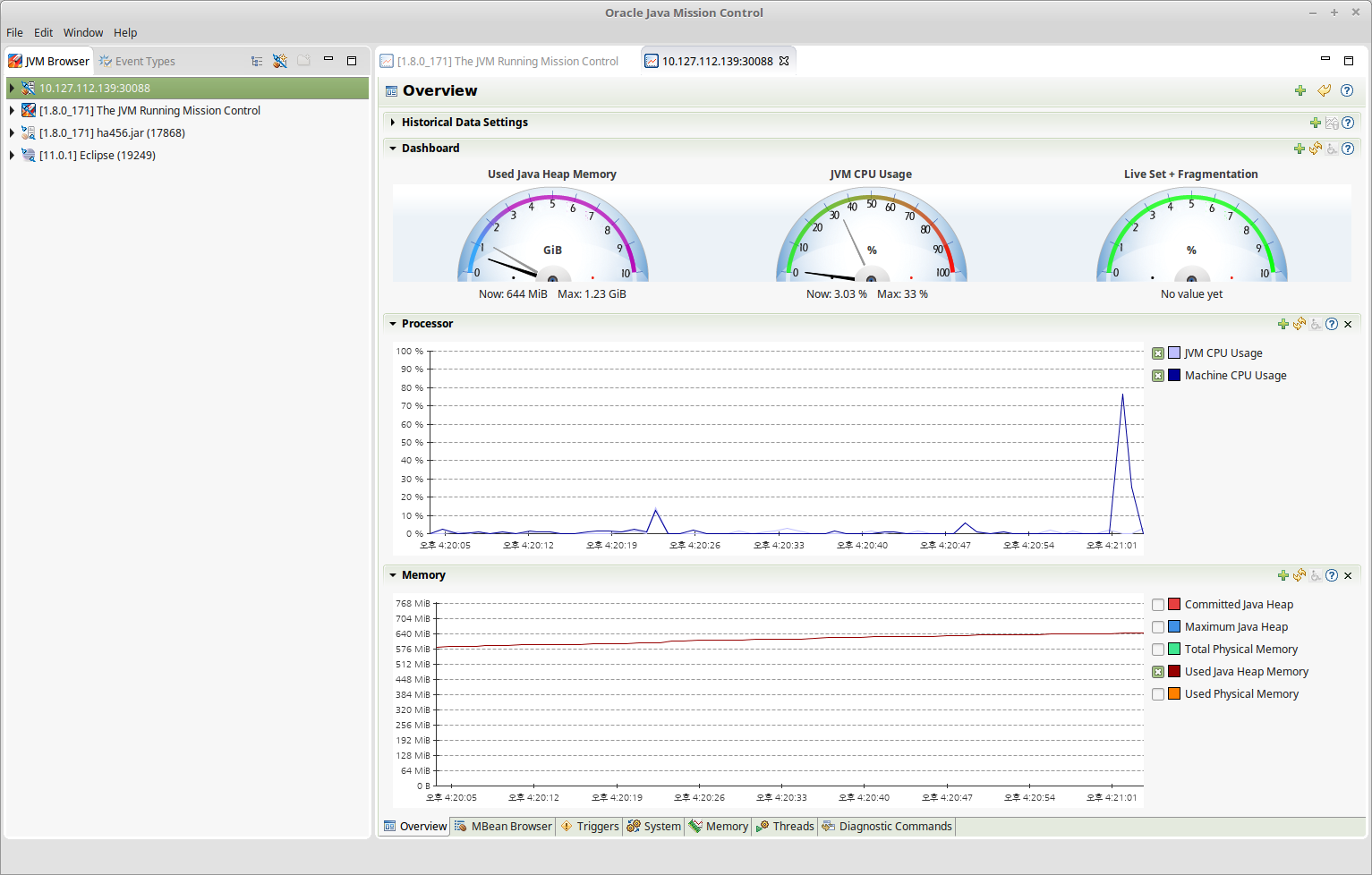
4. JMC 띄우고 원격으로 대상서버 접속하면 끝

요런화면


요런화면도 볼 수 있다. 라이브로 덤프도 볼 수 있고 뭐뭐뭐... 기능은 많다
근데 이거 끼우면 overhead를 감안해야 한다
어느정도인지는 잘 모르겠다능...

2018년 9월 20일 목요일

Z GC ??? 누구냐 넌

딴건 모르겠고

"huge pages" 를 기준으로 대용량 메모리를 할당 했을때를 목표로 한다

센트 7  "huge pages"가 2M다

# cat /proc/meminfo | grep Huge
HugePages_Total:    10
HugePages_Free:     10
HugePages_Rsvd:      0
Hugepagesize:     2048 kB


튜닝할때 이 부분이 가장 묘할듯   OS를  넘나들면서 옵션을 조정해야 한다.

아티클을 봤을때

16G Heap을 지정하려면 Hugepagesize도 같이 튜닝이 필요하므로 

앞서 JVM 옵션만 가지고 튜닝하던것  + OS 튜닝도 같이 계산에 고려해야 한다.


Large pages are also known as "huge pages" on Linux/x86 and have a size of 2MB.
Let's assume you want a 16G Java heap. That means you need 16G / 2M = 8192 huge pages.
First assign at least 16G (8192 pages) of memory to the pool of huge pages. The "at least" part is important, since enabling the use of large pages in the JVM means that not only the GC will try to use these for the Java heap, but also that other parts of the JVM will try to use them for various internal data structures (code heap, marking bitmaps, etc). In this example we will therefore reserve 9216 pages (18G) to allow for 2G of non-Java heap allocations to use large pages.
Configure the system's huge page pool to have the required number pages (requires root privileges):
$ echo 9216 > /sys/kernel/mm/hugepages/hugepages-2048kB/nr_hugepages
Note that the above command is not guaranteed to be successful if the kernel can not find enough free huge pages to satisfy the request. Also note that it might take some time for the kernel to process the request. Before proceeding, check the number of huge pages assigned to the pool to make sure the request was successful and has completed.
$ cat /sys/kernel/mm/hugepages/hugepages-2048kB/nr_hugepages
9216 
NOTE! If you're using a Linux kernel >= 4.14, then the next step (where you mount a hugetlbfs filesystem) can be skipped. However, if you're using an older kernel then ZGC needs to access large pages through a hugetlbfs filesystem.
Mount a hugetlbfs filesystem (requires root privileges) and make it accessible to the user running the JVM (in this example we're assuming this user has 123 as its uid).
$ mkdir /hugepages
$ mount -t hugetlbfs -o uid=123 nodev /hugepages 
Now start the JVM using the -XX:+UseLargePages option.
$ java -XX:+UnlockExperimentalVMOptions -XX:+UseZGC -Xms16G -Xmx16G -XX:+UseLargePages ...
If there are more than one accessible hugetlbfs filesystem available, then (and only then) do you also have to use -XX:ZPath to specify the path to the filesystems you want to use. For example, assume there are multiple accessible hugetlbfs filesystems mounted, but the filesystem you specifically want to use it mounted on /hugepages, then use the following options.
$ java -XX:+UnlockExperimentalVMOptions -XX:+UseZGC -Xms16G -Xmx16G -XX:+UseLargePages -XX:ZPath=/hugepages ...
NOTE! The configuration of the huge page pool and the mounting of the hugetlbfs file system is not persistent across reboots, unless adequate measures are taken.


==================
참고

http://openjdk.java.net/projects/zgc/

https://wiki.openjdk.java.net/display/zgc/Main


JEP 333 ZGC A Scalable Low-Latency Garbage Collector (Experimental) (JDK-8197831)

hotspot/gc
The Z Garbage Collector, also known as ZGC, is a scalable low latency garbage collector (JEP 333). It is designed to meet the following goals:
  • Pause times do not exceed 10 ms
  • Pause times do not increase with the heap or live-set size
  • Handle heaps ranging from a few hundred megabytes to multi terabytes in size
At its core, ZGC is a concurrent garbage collector, meaning that all heavy lifting work (marking, compaction, reference processing, string table cleaning, etc) is done while Java threads continue to execute. This greatly limits the negative impact that garbage collection has on application response times.
ZGC is included as an experimental feature. To enable it, the -XX:+UnlockExperimentalVMOptions option will therefore need to be used in combination with the -XX:+UseZGC option.
This experimental version of ZGC has the following limitations:
  • It is only available on Linux/x64.
  • Using compressed oops and/or compressed class points is not supported. The -XX:+UseCompressedOops and -XX:+UseCompressedClassPointers options are disabled by default. Enabling them will have no effect.
  • Class unloading is not supported. The -XX:+ClassUnloading and -XX:+ClassUnloadingWithConcurrentMark options are disabled by default. Enabling them will have no effect.
  • Using ZGC in combination with Graal is not supported.

2018년 8월 23일 목요일

안산시 대피소 정보

안양 살때는 근처 아파트 지하주차장이 2등급 방호 대피소였는데

이사온 안산은 주민자치센터 대피소도 3등급이다

사실 3등급은 그냥 대피정도 가능한 곳이고  방폭이 어느정도 가능한 지하시설이다

화생방이나 핵등의 방폭방화는 1등급에서 가능하다

안사에서 보면  신혼때 살았던 안산 사1동  주민자치센터가 1등급이다  아마도 지휘시설용으로 만들어 놓은듯

일단 문제가 발생하면

1차  이동 주민자치센터 (공공시설이다 방호등급 3)
1차 이동 푸르지오 2차 아파트 (지하공간이 넓다 방호등급 3)

상태가 심각하면

2차 사1동 주민자치센터(공공시설물에 방호 1등급) 로 튀면 되겠다


2018년 8월 18일 토요일

간만에 작정하고 덤비는 자동차 자가정비

2018년 8월 18일 토요일  10:00~13:00 3H

작업후 업데이트는.....언제쯤이나 할꺼나....

이젠몰 DIY샵 셀프정비
https://m.blog.naver.com/PostList.nhn?blogId=illangel
정비예약
https://booking.naver.com/booking/10/bizes/99636?area=bns

차종 : 카렌스 2000 1.8 LPG


1. 작업내용
미션케이블 부싱교환(완료)
마이너스접지(완료)
계기판 램프교환(완료)
리어휀다부식 처리 및 도색( 도색1회+클리어 남았음 )
실린더세척
엔진헤드커버(일명 짐바가스켓) 개스킷 교환
엔진플러싱, 오일교환, 팬 세척 실링
미션 오일교환, 팬 세척실링
캘리퍼 메인터넌스
리어 스테빌라이져 링크 와  부싱


2. 작업순서
플러그 제거 -> 실린더거품도포(10분)-펌핑 -> 석션 및 클리닝->
헤드커버탈거 -> 개스킷교환(청소.실링) -> 헤드커버조립(10mm  0.8~1.2kmg) ->
플러그 조립(1.5~2.3kgm) ->

엔진오일 석션 1리터 -> 클리너투입 -> 시동후 공회전 15분

시동 Off + 리프트업->
엔진오일 드레인(14mm  3~4.2kgm) -> 엔진오일 필터 제거 ->
엔진 오일팬 제거 ->
미션 오일 드레인  ->
미션 오일팬 제거(제거시 볼드 위치 마킹할 것 긴거 짧은거)  -> 팬 세척

엔진오일필터 장착
엔진오일팬 실링 장착(???mm  0.8~1.1kgm)
미션오일팬 실링 장착(???mm  0.8~1.1kgm)  8개 볼트 A형 B형 다름) -> 1시간 대기(다음작업진행)

스테빌라이져 링크,부싱 교환(??mm   4.4~6.2kgm) ->
리프트다운
타이어 분리(21mm   9~12kgm) ->
캘리퍼 분해, 구리스도포 (좌 프론트, 좌 리어) -> 타이어 장착

엔진오일.미션오일 주입 -> 주행테스트

==============
3. 구입내용

미션오일 현대모비스 순정 ATF-SP 3 4L  1개 : 2만원
엔진오일 S오일 7 RED1 5w30 4L  2개 : 2만3천원 (다음에도 쓰려고)
오일팬 가스킷(구입)  : 5천원
엔진오일 누유 방지제 (구입)  : 록타이트 스탑리크 1만5천원 (엔진 헤드도 소량 누유중)
엔진오일필터, 에어필터 세트 :  1만2천원
연소실 클리너(거품식) MX-5000 4개 :  2만원
발보린 플러싱오일 1L 2통 : 9천원
퍼머텍스 울트라카파 RTV 실리콘 가스켓 101BR 85g 1개 : 1만 6천원  (헤드커버게스킷용)
록타이트 실리콘 가스켓 5910 50ml 2개 : 1만 6천원 (오일팬 개스킷작업용)
LPG 연료필터 4개 : 11880원
링크 어셈플리컨트롤 좌우: 13200원  (스테빌라이져, 활대) -주행시 뒤쪽이 달달달
링크 부싱 2개 :  1100원

리프트 1시간 1만원 대여
오일받이 (샵)
깔대기  (샵)
셕선, 임팩드라이버, 기타 공구 (샵)

개인공구
드라이버, 복스알세트, 토크렌치
뺀치, 니퍼, 케이블타이
오일종이, 걸래 , 장갑, 실리콘 장갑 
철솔, 붓, 엔진룸세정액, 엔진크리너,알콜,부식제거제


4. 작업시 정보 (공구사이즈 및 체결토크)
엔진오일 드레인 볼트 14mm  3~4.2kgm
엔진오일 팬 볼트 10mm  0.8~1.1kgm
미션오일 드레인볼트 ????
미션 오일 팬 볼트 ???mm  0.8~1.1kgm

타이어 볼트 21mm   9~12kgm
스태빌라이져 컨트롤 링크  ??mm   4.4~6.2kgm

캘리퍼 프론트 (52-13)
락 볼트 4.6~6.9 (켈리퍼 고정볼트)
볼트 2.6~3.0  (동작부위)
캘리퍼 리어   17mm (52-17)
락 볼트 3~4 (켈리퍼 고정볼트)
볼트 4.6~6.8  (동작부위)

언더커버  10mm  1.4~1.6 kgm
실린더헤드커버  10mm  0.8~1.2kmg
점화플러그 1.5~2.3kgm
엔진오일필터 : 손으로장착 -> 렌치를이용하여 1과 1/6 (60도) 회전


5. 오일량 및 측정 기준

미션오일  : 5.2L 정량 그냥 빼면 2L 나오고 3L는 토크컨버터 안에 있음
엔진오일 : 3.6L 정량  (오일필터 200ml)

미션측정 :
기준 : 예열상태 +  P-1로 각 단계별 5초대기  2~3회 수행  HOT 구간 확인
HOT 측정 - 예열 + 시동ON +  P 상태에서 체크  (HOT 구간)
Cool측정 - 시동걸기전 Cool 구간

엔진오일 : 예열 + 시동OFF  상태에서 5분후 체크
2018년 7월 26일 목요일

JVM 까보기


리브레 오피스로 작성했더니...

이걸 PPT로 바꾸면 깨지고... html로 export해도 못쓰것고..

odp 파일을 google slide에서 읽어들이고 깨지는 부분 조금 수정한 후 저장

그리고  메뉴에서 "퍼블리쉬 투 더 웹" 메뉴 선택해서 "임베디드"선택하면 html 코드로 생성되고

그걸 블로그에서 HTML 편집기 상태에 붙여 넣는다....그럼 아래 같이 나온다...

젠장 졸 복잡하내